London based Post-graduate with a passion for games and game design!
Showing posts with label KittyKABOOM. Show all posts

11 Apr 2017

Kitty KABOOM UI and Menus


To make the shapes for the UI I used the pen tool so that I could get very crisp edges. I then also desied to use the photoshop effects to add demention to the UI assaets, insted of painting them by hand. Doing this allowed me to keep the assaets looking uniform and neet. It also made the prosses faster as once I had a effects set I liked I saved it and simply aplyed it to the others.This proses still took some time as I don't have that much pratice with the prn tool, and getting the effects the ways I wanted them still took a lot of trile and error. To get the bubbly shiny look I wanted I still had to add small bits of highlights and colour by hand. I also used the pen tool to crate the two fonts I used for the title, and I also wanted to crate an entier font for the game using the same two style, but I didn't have the time. I put all the assects onto one sheet as it takes up less space and made it easire to inport then into the game. When making the assets I also sometimes made veriations in the same sheet incase the design I when with didn't work well or I had changed my mind.


As the art style of the game had changed, I desided to redraw the main characters so that it was more clear what their refance should look like. I wanted to do more indepth character sheets, but due to time I desided to leave it as it wasen't really needed. To save time, I desided to used this picture for the main menu of the game, both because I didn't have time to do something else, and as I wouldn't have to to make a cut scean fo the game, I feel like this image will at least introduce the characters to the player. 


14 Mar 2017

KittyKABOOM Enemy Conpects

Munchers

I desided to go for robot enemies insted of organic ones, as they would be easier to animate and model. I also thought that the player shooting a real living creatures could seem more violent then intended. I also wanted to use the same shapes and look of the queen to influence the robots. At first I tried making a mouse tank type vehicle to fit in with the cat tank. But as the code I used was based on a zombie  enemies, the enemy needed to look like they would deal out damage in a slimier fation. I did a drill like design as the spinning would be easy to animate, but then I changed it to an "eating" robot, as it was already sapost to resemble a mouse, and mice has mouths, not drills. So visually this made more sence. 


I also desided to make a simple/crude test model so I could get a better understanding of what this robot would look like in 3D. I also needed it so I could see what the design would look like in the orthographic view of the game. 


Doing this helped me to see that I had to pay special attention to the ears as from an angle they may not read as ears at all. I kept this in mind when making the actual model and made the ears extra big so that they can be clearly seen in game. This dose make them look strange in a front view but it helps them to be seen diagonally. 


Cages and Cats

At first I wanted to make some cats as colectables for the game, but then I desided to change them from collectibles to objectives as it makes more sence with the goal of the game. I also made this change as I was having a hard time trying to deside what the boss section of the level would be like. Having one big turret was too easy and boring, so at first wanted it to be some form of big mouse robot with different kinds of ammunition that the player would have to avoid wile trying to attack it. Though this would have been more entertaining, I didn't have the know how to do this, or the time to lean how to eather. Because of this I had to think of a simpler way to make the boss section more engaging without having to add much. As there is a round about in the boss section, I thought that I should have some turrets curcel around it, as this would be easy to implement and the addition of a moving target could be fun. I then also desided to make the turrets cages that have the cats inside to make the player feel more determind to fight them.

I desided to use the same cat model for each cat, even though they all look different in the consent. This is because it will be easier to add more cats this way in the future, and as the wont be very big on the screan, the player might not even notice the differences if I was to model them. I changed the faces of the cats in the texture as adding the bigger cat eyes didn't translate well. 


Even thought at this point the art style of the game had changed to the lined toon look, I still did a panted concept fro the cage as I find it easier to paint non organic things, specially when I'm not sure what they look like. I made sure to keep to yhe same shapes and colours as the other mice related things to make so it all looked cohesive.


28 Feb 2017

KittyKABOOM Level Design


To crate the environment for the level, I first took a birds eye view screen shot of the grey box and ternt it into a template for the modelling proses. I new I wanted the first level to be on the street where Margret lives, to show that the mice have taken over and the after math of that. When doing the concepts for this, I had a hard time trying to draw what this normal street would look like which aliens taking over. As environment art is my weakest aria, I really strugled with trying to produse something that I was happy with quality wise. I desied to simply finish the normal street, then work on modaling the other assets so tha tI could try dressing the street in Unity and Maya. 


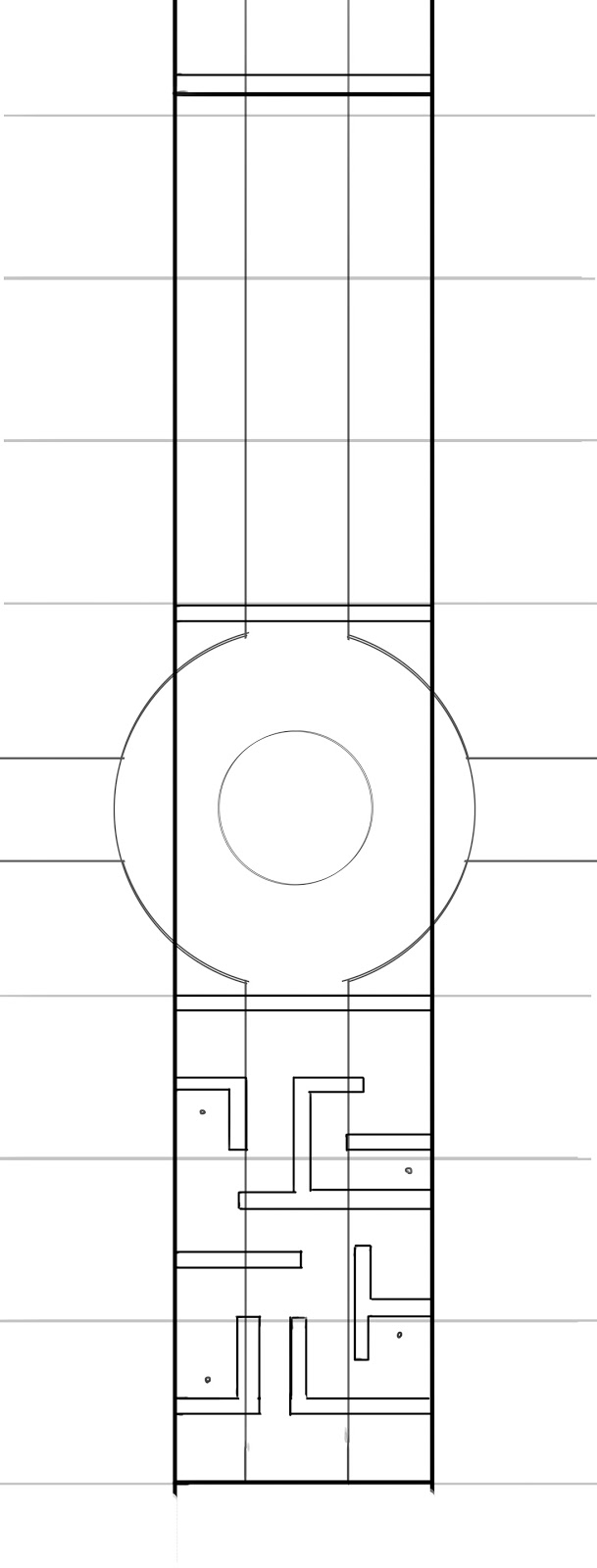
To make sure the modled environment mached that of the gray box, I took a birds eye screen shot of it then drew a map over it in Photoshop. I then used this as the template for modeling the level. At first, I was going to make the maze part out of different things from the steeet that had been knocked over or crashed into to form the shape of the maze. I wanted to do this to show how the people had goten into panic once the mice invaded. However, after modeling the assets, I realized that making the maze in this way looked very disorganized and nonsensical. Specially as the player would be in a tank, so realistically they could just run over thses things. So insted I desdied to change it to a maze that the mice set up to stop people from running about freely. It would also reflect the motif of putting mice in to mazes.


To deside what the  walls for the maze should look like, I started with some quick sketchs, but then thought to be would easier and quicker to try modeling different versions as a way of consepting them insted. This really helped as I could see what they will look like all around as well as hopw meny polys each design will take. Once I had designed on a design, I used this to make the maze and other barrias that the Mice had put up.


When texering anything for this game, I made sure that the colors are a little duller then intened, as the toon shadier make everything much more saturated in game. I moved the round about to the boss aria as it made more sence for the larger space to be for the bigger fight. At first, I thoght I was going to put the boss at the center of the round about, but as I changed it to the cages I added the tern sight to the centr insted. The edges of this aria was also very bland, so I modled a tree and changed the scaling around to add some veried trees.


For the items that the player can pick up, I wanted them to be easily identifiable, but still relate to cats in some way. I went with the plus for the health as it had instant understanding as health, so I felt there was no resion to confuse that. I thought about using the heart, as a lot of the environment was green so I was worried tha the green plus would clash with this. But making it a heart when the UI was a slider I felt confused the conection, so I would have to change the health to hearts also. But this would mean I would have to re-code how  the health worked, which I didn't want to waist time with.


29 Nov 2016

KittyKABOOM Alpha

For the alpha, I wanted to develop the codes I has previously made, and make game play with it. But before this, I desided t make a new game project folder and inport the working codes. I also needed to do this as ther last folder still had the tank tutorial that I used for refrance in it. This did mean some of the elaments like the partical effects and UI elaments I would have to leave behind and work on my own, but there where place holders in the first place. 
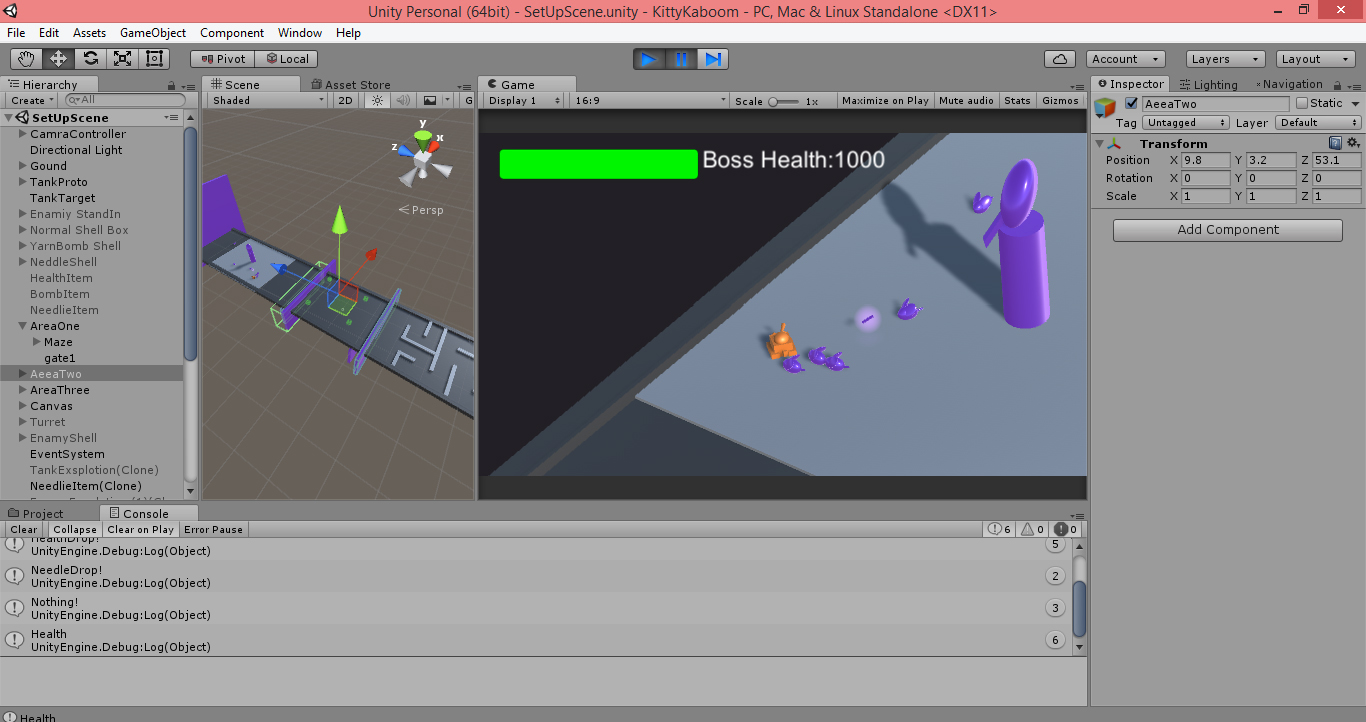
I had let some people test out the prototype, and one of the biggest complats was that the movement controls where tricky and took time to get the hag of. To help with this, I made the beging of the level a maze and put some  keys that the player will have to collect. I found by doing this, it alows the player to used the movement controls without worrying about the shooting at the same time. However, a problem that arised was that the tank's pysics will make it bump around when it hits any of the walls. I desided to tern the phisicis off, as previosly they where on as the bullet shell had the ability to push things bast of the force of the blast. But as I wasen't using this feature, it was fine to take out the forses. But this corsed the tank ingnore all the colliders on the walls, and simply passed throgh everything. To fix this, I simply added a nav mesh agent to the tank, which was simple as the nav msh was alrady set up for the enamies.
 I then made a second section which has the sporning enaies. I had problems with this at first, as the spawning code didn't like being terned off and on, and often didnt work. So I mad a level ganiger type code that terns all the objects in the section on and off, insted of the spasific scripts which seemed to work better. However, the spawning scrip still didn't want to stop, even after I had terned the object off, so I added a eneamie cap to it, so after a certen amount of enemies have been spawned, it stops.
I felt like the ending of the level needed a boss like characters, but I didn't have eanouth time to make one. So I used a turret as a place holder. Though a boss is  something a really want to add, I feel like the coding to make one well/ interesting may be too deficalt for me, or at least take up too much time. I still put some time into my scesul for text term to make one, but if it becomes to troublesome, I will have to find another way to make the difficulty progression interesting.


I made some new basic assets as by this point, I had pladed to make some masic models in Maya, but scripting too much longer then planed. I put in some colours as well so players can see the diffrence between the different elements. I also added some lights and partical effects to things, just to make them more intresting. I also wanted to play around the the partial as I will have to make quite a few next term once I made the sprits.


22 Nov 2016

KittyKABOOM Evil Queen Consepts


Before making the enemies, I wanted to make the evil commander character so that I had a better idea of what the invaders look like. I was having troble thinking of the shapes I wanted to used for the commander, but I knew I wanted her to be very tall and slim. Because of this, I desided to uses Zbrush as a tool to get some ruff ideas out. I'm not very good at Zbrush, but I know how to uses most of the basic modelling tools, and as this was just for shape ideas, I didn't mind if it didn't look polished.


I then used this to start doing some different designs. At first, I stuck with more of  a demon/alien design aesthetic. I wanted to use a lot of sharp edges and sipcks to show that shes a bad guy. But I still wated her to look feminine and reagel, to she that she is very impotent/ has high statis. I then used more animal themes, just to help me think of different shapes. I ended up making a mouse themed one, as it would make more context with a cat themed tank. 


I wanted to work on the mouse design more, spasifacly getting the shapes and details down. I also wanted to practice some value work, so I did everything in gray scale. When making the queen, I still wanted it to look like a mouse, but I also wanted her too look evil and alien. To try and accomplish this, I used some mouse like elamants, like the buck teath and large rounded ears, but abstacted them with pointed edges to make her look dagarose. At first, I wanted the alain race to be more military based, so this character was going to be more of a galactic camcorder, but eventually I changed her to a bossy/ tatrent of a Queen, as I felt like her demanding/ selfish nature fits more for a royle character who is used to being spoled, then a solder based personality. 
Once I had finished the basic design, I added diffrent details would work for the enamies. With the frist design, people said it looked Aztec inspaired, which made her look very regal/ important. But I wanted her to look more sifi then mystical, so I didn't want to go with that one. The next two I tried to make look more spacy. The first one I tried to use mettle plates and rivets to make her look more matalic, but this became too busy looking and looks more steampunk/ had made then alien. For the last one I wanted to use more rounded shapes, to make it look more galatic/ spacey. 


After I had a better grasp on her design, I then tried out some different colours for the Queen. This was impotent as I would then use this colour scheme for the rest of the enmaies. I wanted them to look like aliens, but also look evil, so I used a lot of dark colours with some bright highlights for the detail, so that they stand out more. Thogh the red and black colours did make her look more evil, when people saw it they thoght she was some form of vampire mouse. To try and avoid this I when with the grayish blue colour to show the scifi element of it, as it looks more like metal.
I also included a little alien mouse solder by her side, just to show how much bigger she is from her subjects. I then used this to make a rended version of the concept. I was going to put her into a spaceship environment, but as environment are is my weekist skill it was taking too long. Additionally, there was no place in the game so far where the inside of the ship would be seen, so as it wane't needed for the game, I desided to not do it so that I had time to work on the more impotent thing for the game.


21 Nov 2016

KittyKABOOM Tank Consepts

 Before makeing the tank, I desided to design the player character, as I find making characters easier. Also, if I had a better idea of the character, it might help me make the tank. I defiantly wanted the character to be a old, short lady, as i think the juxtaposition of a small old lady in a tank will be funny.

  
In the end, I went with the more wild look for her, as I felt it would be funnier if she had a very head stong and loud personality. It also made her look more like a cooky old lady, which I think makes more sence then a very quite, sesable lady, as she was sabost to be based on a crazy cat lady. 


Once a had done the lady, I then used that to help me think of what her tank would look like. I tried out some diffrent shapes, themes, and even diifrent viacels to make some tank designs. I liked the steam punk and needled themed ones, as they seemed very had made, and the thoght of her making the tank herself would add to the humor. However, I felt like for this kind of game, the design needed to be more simplistic design, as over complicaing it could make everything confusing. Asesaly if things alrady look like cats and mice. Also, when making the game, so far the camera distance had been quite far from the tank, so if I make the design, too complex, it may not be seen anyway, or even worse become confusing. 

I didn't want to confuse the visuals, so I desided to go for a simplistic design for the tank. This way it will be eaier for players to instantly see that it its a tank and also a cat. I also wanted to work on some colours as well, to make sure the tank really looked cat like. For this progect I wanted to work on consepting skills I'm not very good at, but for this drawing I used my normal style of quick line art and simple shading as its much qucker to do. After seeing this my teacher thoght this style worked well with the quircky idea of the game and it was more toonish. After debating it, I deaided to go forward with the new style as I'm more comftable with it so it will make creating the consepts faster and look better then trying to strugle with a style I'm not so used to.


Going forward with this style I made the model sheet for the tank. There where some parts of this that I struggled with as I couldn't visualize what the tank would look like in 3D. Because of this, some of the line work looks out of place and even mismatched in the different views. Even thogh I could see this, I didn't wont to spent to much time on it as I knew I could work out how these things would look butter once I started modeling them. If I was to send this reference on to someone else, I would have possible modeled parts of it in Maya fist so that the drawing was more accreate, but as I am working by my self this wasn't needed.

The problems I was having drawing some parts of the tank was quickly fixed once I started modeling as i was able to better see how the shapes would work together. To make the tracks for the tank I followed a tutorial that used a curve the help mold the shape I needed the tracks to follow. I also try to use this method and others to try and animte the tracks, but I coden't get this to work. The tracks where sapost to move along the curve but instent they would just rotate around its pivot. As this was taken too long to try and implement I desided to scrap it. However, because of this, the tank looked very bizarre when moving as the tracks where very obioaly not moving. To try and desicse this I desided to ass track covers to the tank as well. This work out better then I thought as the covers pushed the cat look even more and the paws where resived very well by testers. I did in the end deside to animate the wheels as that was much simpler and helped the tank look as if it was moving.  


10 Nov 2016

KittyKABOOM Prototype

Before I started working on the prototype for the game, I followed the Unity Tank tutorial I found so that I could understand the codes  and have a better understanding of what kind of game |I wanted to make. Using these elements, I then boxed out a more simple/ basic tank game so that I could start putting in the elements I anted. I used the health, camera, movement and shooting codes from the tutorial to make the prototype and I also used some of the sound effects and partial effects form the tu, so that those parts of the codes would still work.

As I wanted the game to be single player, I then needed to add some enimies. I desided to used the same health script as the tank, as it was layer dependent. This means, the bullets would only effect objects in the enemy layer. I then used a look at/ transform script to make them chase the player, and a damage code so that they slowly take away the player's health. I has to make my own turret controls as the tutorial only had the tanks world movement. I used a simpler method as the point and click game, in that I make a code that follows the mouse position. I attached that to a invisible game object, the make the turret look at that object. This alows it to pivot and aim separably from the tank.

I desided to make the enemies to attack like this insetd of shooting as that would require much more complex coding, which would take much more time. I then found I spawn code that uses an aray of spawn points and instantiates enemies randomly. I then made a code simler to this to make an item drop code, which drops power ups when a enaey dies.


For the power ups, I did a health pack and different weapons/ammunition. The first one I made was a bomb weapon. I used the same shell code, but changed the virables so that the bomb would  be more powerful and have a wider exploitation range. I then wanted to make a fast shooting power up that was more like a machen gun then a tank shell. This ment I had to make a new shell movement script, as the original one gose further based on how long the fire button is pressed, and is also effected by gravity. So I made one that makes the shell just fire straight, but this  ment I also had to make a second fire transform as the first one is slanted up so the shells arc.
I also wanted to make a second kind of enemy, so I used the tank turret codes to make a enemy turret as well.


25 Sept 2016

Tank Game Initial Ideas

For my 3rd year project, I want to make a game as I want to work on mt game design. But as I will be working by myself, I need to make sure the game play/ macanics are simple so I can have anouth time to do everything to a high quality.

I found a unity tutorial on how to make a tank game, so I desided to use that as a starting point. As I've made a shooting game before, this woden't be too far off my skill set, but still alow me to learn new things. I also wont have to worry to much about animation, and the codes are versitil so the over all direction of the game is very open.

At first, I was inspired by the cat themed tank I made in first year. I thought about doing different themed tanks that battled each other in a PvP game. But I coden't think of a way to link them all together in a game that made seance. So I then tried to think of some single theme ideas.
As I did some sketches of a bee themed tank, I though to make the game bee/bug themed. To make sence of them fighting each other, I thought to make it a battle to be queen. This way I would be able to design different female characters, which is my strong sute, as well as some different tank designs to match each character.
Wile I was drawing up some characters fo the bees, I thought about doing something less human looking and more in lines of an anthropomorphic insect look. When doing these, I thought they looked more like aliens, so I also sketched some space ships based on the shapes of each design. I liked this a lot more, as I found it easier then trying to make multiple bee themed tanks that still looked unique from each other.


Even thogh I liked this direction, I realized that designing multiple ships and characters may be too much work for me, consisaring I will have to do everything else for this project as well. So I needed to change my idea to something that would only require me to make one ship or tank design to save on time. This is when I went back to my origonal cat tank design. As the design is very simple, it woden't take too long to model and as its a cat, I could used diffret trxures to destiguse the diffret players.